
Before applying any of these rules, confirm that the shipping and packing process aligns with one of the logics outlined below.
There are four rule types for auto-calculating shipment details, with only one applicable at a time. Activation is required both at the account level and for each individual user.
These rules can be found on the Rules page under the General tab in the Auto Pack section.
Calculate Shipment Details Based on Product Catalog Setup: Ideal when products are not mixed within the same package during shipping.
Use Volume Calculation for Auto Pack: Determines packaging based on total shipment volume.
Use Packages Calculation: Calculates shipment details based on predefined package configurations.
Auto Pack Using Specific Packages: Automatically assigns shipments to designated package types.
To enable a rule for a user, it must first be activated at the account level. Once enabled, the rule can be set for the user in User Manager under Advanced Settings → Shipment Details Defaults. The dropdown will display only the options that have been activated on the Company Page.
Note: Auto Calculation does not work for Truckload shipments.
Order Management
When auto-calculation is enabled, companies with integrations that batch import orders into Order Management on a timed service will have auto-calculation triggered automatically upon import—provided product details are available and shipment dimensions are not included in the imported order. If dimensions are present, auto-calculation will not run automatically and must be triggered manually.
Notes
When auto-calculation runs, it will use the users default Commodity description for each shipment details line it creates. If the user does not have a default Commodity description set, it will use the product details item description. If multiple items are packed into a single box/pallet, the product details item descriptions will be combined, separated by a comma (up to 500 characters).
In the case that the combined description exceeds 500 characters, the description will default to the following: “Please add description via User Manager”. The suggestion is to add a default description at the user level if you expect your combined item descriptions to exceed the 500 character maximum.
Rerun Auto-Calculation on Order Consolidation
When the auto-calculation rule is enabled, users have the option to trigger auto-calculation when consolidating orders from Order Management. This ensures that shipment details are recalculated based on the combined product details of the consolidated order.
To use this feature:
Ensure auto-calculation is enabled at the company level under Company > Rules
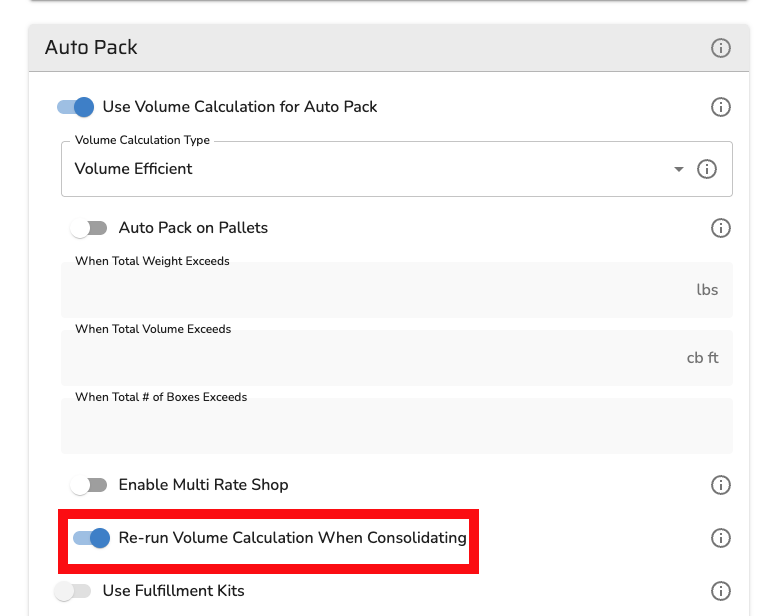
Ensure auto-calculation is enabled for the individual user
When consolidating orders from Order Management or Quote/Ship, the system reruns auto-calculation on the resulting consolidated order
The recalculated shipment details reflect the combined product lines from all consolidated orders
This is in addition to the existing auto-calculation triggers:
Manual trigger
Batch import
Live import to Quote/Ship (when shipment details count is zero)

